Socket Programming
We want to use Java to set up a socket based network connection. In particular, we want to write code that runs in each processes on either end of a network connection.
                client_host                                              server_host
+-------------------------------------------+                 +---------------------------------+
|              client_process               |                 |               server_process    |
|              +-----------+                |                 |               +-----------+     |
|              |           |                |                 |               |           |     |
| keyboard >-->> 0       1 >>--+--> console |                 |           >-->> 0       1 >>--> |
|              |           |   |            |                 |               |           |     |
|              |         2 >>--+            |                 |               |         2 >>--> |
|              |           |       socket   |                 |   socket      |           |     |
|              |           |      +------+  |                 |  +------+     |           |     |
|              |         3 >>---->>      |  |   tcp network   |  |      <<---<< 3         |     |
|              |           |      |      O=======================O      |     |           |     |
|              |         4 <<----<<      |  |   connection    |  |      >>--->> 4         |     |
|              |           |      +------+  |                 |  +------+     |           |     |
|              +-----------+                |                 |               +-----------+     |
+-------------------------------------------+                 +---------------------------------+
All the example code mentioned in this document is in the following zip file.
Client/Server sockets
In the above picture, the relationship between the two hosts is not symmetric. Each host plays a particular role in the network connection. One host is the server and the other host is the client.
What makes a host a "server" is the kind of socket that it creates. Java has
two classes that represent sockets, a ServerSocket class and a Socket
class.
A server process needs to be ready to accept a client connection at any time.
A server process needs a kind of socket that is always "open" and ready to
answer a client's connection request. Java's ServerSocket objects play this
socket role.
A ServerSocket should not be responsible for communicating with a client.
This is not an obvious fact. We would think that communicating with the
client would be the main responsibility of a ServerSocket. But if a
ServerSocket is busy handling communication back and forth with a client,
then the ServerSocket will not be ready to answer a connection request from
a new client. So a ServerSocket does not handle client communication. We
will see below that a ServerSocket passes off the responsibility of
communicating with a client to a regular Socket object.
A ServerSocket object has the responsibility of creating connections to
clients but not communicating with them. A Socket object has the
responsibility of communicating with another Socket object.
Network connection
In networking jargon, a "connection" (or "tcp connection") is thought of like this
                           a tcp connection
        IP address O==============================O IP address
        Port number                                 Port number
A connection is a pair of endpoints and each endpoint is an ip:port
address pair. So a connection is a pair of pairs, (ip:port, ip:port).
At each endpoint of a connection there is a socket. The socket's ip:port
pair is called the "socket address".
        socket                                         socket
    +-------------+                                +-------------+
    |             |        a tcp connection        |             |
    | IP address  O================================O IP address  |
    | Port number |                                | Port number |
    |             |                                |             |
    |             |                                |             |
    +-------------+                                +-------------+
Java has a class that represents IP addresses and another class that represents socket addresses.
Each socket is bound to the port number on its end of the connection and is connected to the socket on the other end of the connection.
Know these terms:
- connection
- endpoint
- socket address
- bind
- connect
Since a client must know both the IP address and the port number of any server process that it wants to communicate with, the server's address and port number must be known to the client before it makes the connection. Public servers make their IP address and port number well known to the public and they do not change them.
On the other hand, the server process does not need to know ahead of time the IP address and port number of any client that wants to create a connection. The client chooses any port number it wants and sends its IP address and chosen port number to the server as part of establishing the connection. Usually, the client lets the operating system chose a port number. When the operating system chooses a port number, it is referred to as an "ephemeral port number". Since the server's port number needs to be know to everyone, a server's port number is called a "well known port numbers".
bind, listen, accept, connect
In this section we will describe the steps used by a server process and a client process to establish a tcp connection and then communicate with each other over the connection.
The steps below are based on the C language's "sockets interface". Sockets were invented for C, so that is the original Socket API. The Java Socket API combines a few of these steps from the C API, but when something goes wrong, the JVM's error messages often refer to the C steps by their C function names.
Also, sockets are part of every modern operating system and the Socket API has an implementation in almost every modern programming language. A Java client running on a Windows host might be communicating with a C server or a JavaScript server running on a Linux host. The steps below are a language neutral sequence that reflects what is happening in the operating system.
If you look at the programs "EchoServer_v1.java" and "EchoClient_v1a.java" (from the simple_client-server_pairs.zip folder) you can see these steps implemented in Java code. The Java code has comments that label the code according to which of these steps the code is implementing.
Step 1) The server process creates an unbound ServerSocket. This
ServerSocket is not yet able to establish connections
with clients.
                                                    ServerSocket
                                                   +-------------+
                                                   |             |
                                                   O IP address  |
                                                   |             |
                                                   |             |
                                                   |             |
                                                   +-------------+
Step 2) The server process binds its ServerSocket to a port number.
This ServerSocket is not yet able to establish connections
with clients.
                                                    ServerSocket
                                                   +-------------+
                                                   |             |
                                                   O IP address  |
                                                   | Port number |
                                                   |             |
                                                   |             |
                                                   +-------------+
Step 3) The server process puts its ServerSocket in a "listening" state.
This creates a backlog queue for newly connected clients. The
ServerSocket can now establish connections with clients. Any
client that connects is put into the backlog queue. Connected
clients cannot yet communicate with the server process.
                                                    ServerSocket
                                                   +-------------+
                                                   |             |
                                                   O IP address  |
                                                   | Port number |     +----------+
                                                   |             |     |connection|
                                                   | backlog-----|---->|  queue   |
                                                   +-------------+     +----------+
Step 4) The server process calls the accept() method on its ServerSocket.
This tries to remove one connected client from the backlog queue.
The server process blocks if the backlog queue is empty. When a
client connection is placed in the backlog queue, the server
process will go to Step 7.
Step 5) A client process creates an unconnected Socket.
        Socket                                      ServerSocket
    +-------------+                                +-------------+
    |             |                                |             |
    | IP address  O                                O IP address  |
    |             |                                | Port number |    +----------+
    |             |                                |             |    |connection|
    |             |                                | backlog-----|--->|  queue   |
    +-------------+                                +-------------+    +----------+
Step 6) The client process asks its Socket to connect to the server's
ServerSocket. The client socket is bound to an "ephemeral" port
number. When the client's connection to the server is established,
the connection is placed in the server socket's backlog queue.
(This picture would be just before this connection is placed in
the backlog queue.)
        Socket                                      ServerSocket
    +-------------+                                +-------------+
    |             |      tcp connection            |             |
    | IP address  O================================O IP address  |
    | Port number |                                | Port number |    +----------+
    |             |                                |             |    |connection|
    |             |                                | backlog-----|--->|  queue   |
    +-------------+                                +-------------+    +----------+
Step 7) When accept() finds a connection in the backlog queue,
the ServerSocket will create a new communicating Socket
and connect the client's Socket to this new Socket. The
accept() method will return a reference to this new Socket.
The ServerSocket is ready to go back to Step 4. The new
communicating Socket is ready to go to Step 8.
(This picture would be just after the server's accept()
method returns.)
        Socket                                      ServerSocket
    +-------------+                                +-------------+
    |             |   tcp connection               |             |
    | IP address  O==================\             O IP address  |
    | Port number |                  \\            | Port number |    +----------+
    |             |                   \\           |             |    |connection|
    |             |                    \\          | backlog-----|--->|  queue   |
    +-------------+                     \\         +-------------+    +----------+
                                         \\
                                          \\           Socket
                                           \\      +-------------+
                                            \\     |             |
                                             \=====O IP address  |
                                                   | Port number |
                                                   |             |
                                                   |             |
                                                   +-------------+
Step 7a) If the server process is parallelized, then one thread from
the server process can go back to Step 4 and call accept()
on the ServerSocket while another thread goes to Step 8 and
begins communicating on the new Socket. If the server process
is single threaded (not parallelized), then the ServerSocket
cannot establish a communicating connection with another client
while the server process's single thread is communicating with
the current client. However, the operating system will continue
to queue up new (non-communicating) connections in the backlog
queue of the server socket.
Step 8) The client and server processes get input and output streams
from their communicating Socket objects.
        Socket                                      ServerSocket
    +-------------+                                +-------------+
    |             |   tcp connection               |             |
    | IP address  O==================\             O IP address  |
    | Port number |                  \\            | Port number |    +----------+
    |             |                   \\           |             |    |connection|
    |             |                    \\          | backlog-----|--->|  queue   |
    +-/|\-----\ /-+                     \\         +-------------+    +----------+
       |       |                         \\
       |       |                          \\           Socket
       |       |                           \\      +-------------+
    output   input                          \\     |             |
    stream   stream                          \=====O IP address  |
                                                   | Port number |
                                                   |             |
                                                   |             |
                                                   +-/|\-----\ /-+
                                                      |       |
                                                      |       |
                                                      |       |
                                                   output   input
                                                   stream   stream
Step 8a) In the case where the server is not parallelized and
can only handle one communicating connection at a time,
if a second client establishes a connection with the
server, then that client can get input and output streams
from its Socket object while that client is still in the
backlog queue (but the client Socket cannot communicate
with the ServerSocket). In other words, the new client's
Socket can move from Step 6 to Step 8 while the client's
connection is stuck at Step 6.
        Socket                                      ServerSocket
    +-------------+                                +-------------+
    |             |       tcp connection           |             |
    | IP address  O================================O IP address  |
    | Port number |                                | Port number |    +----------+
    |             |                                |             |    |connection|
    |             |                                | backlog-----|--->|  queue   |
    +-/|\-----\ /-+                                +-------------+    +----------+
       |       |
       |       |
       |       |
    output   input
    stream   stream
Step 9) The client and server processes implement an application layer protocol using the tcp connection and its associated streams. A Java client or server process will wrap the input and output byte stream with whatever higher level stream is appropriate for the agreed on protocol (a text protocol or a binary protocol, etc.).
Step 10) At some point, either the client or the server process closes
its end of the tcp connection by calling the close() method
on its Socket. When the other endpoint detects this, the
other endpoint closes its end of the connection by calling
close() on its Socket.
(NOTE: Calling close() on a Socket is not the same
as closing either of the socket's two streams.)
        Socket                                      ServerSocket
    +-------------+                                +-------------+
    |             |                                |             |
    | IP address  O                                O IP address  |
    | Port number |                                | Port number |    +----------+
    |             |                                |             |    |connection|
    |             |                                | backlog-----|--->|  queue   |
    +-/|\-----\ /-+                                +-------------+    +----------+
       |       |
       |       |                                       Socket
       |       |                                   +-------------+
    output   input                                 |             |
    stream   stream                                O IP address  |
                                                   | Port number |
                                                   |             |
                                                   |             |
                                                   +-/|\-----\ /-+
                                                      |       |
                                                      |       |
                                                      |       |
                                                   output   input
                                                   stream   stream
Step 11) The two unused communicating Socket objects get garbage collected.
                                                    ServerSocket
                                                   +-------------+
                                                   |             |
                                                   O IP address  |
                                                   | Port number |    +----------+
                                                   |             |    |connection|
                                                   | backlog-----|--->|  queue   |
                                                   +-------------+    +----------+
Step 12) If the server process wants to serve another client, then the server
process should once again call accept() on its ServerSocket and
create a new communicating socket for a client connection (that is,
go to Step 4). However, if the server process no longer wants to
serve clients, then the server process should call the close()
method on its ServerSocket and free up the port it is bound to.
Here are illustrations that summarize the above steps.
Here are the Linux manual pages for the core functions in the sockets
interface, socket(), bind(), listen(), accept(), and connect().
- socket(2) - Linux manual page
- bind(2) - Linux manual page
- listen(2) - Linux manual page
- accept(2) - Linux manual page
- connect(2) - Linux manual page
Using JShell
We can use JShell to demonstrate the client/server steps outlined above. We will use two JShell sessions. In one session we will run server code and in the other session we will run client code.
Open a JShell session and type this line of code at the JShell prompt. This JShell session will be the "server session".
var ss = new SeverSocket(5000) // Steps 1, 2, 3.
In another JShell session, type these two lines of code. This JShell session will be the "client session".
var s1 = new Socket("localhost", 5000) // Steps 5, 6.
var s2 = new Socket("localhost", 5000) // Steps 5, 6.
We now have two client sockets connected to the one server socket. The two
connections are both in the server socket's backlog queue. We cannot do
much with either connection until the server socket accepts them. But we
can get I/O streams from these client sockets.
var in1  = s1.getInputStream()   // Step 8a.
var out1 = s1.getOutputStream()  // Step 8a.
var in2  = s2.getInputStream()   // Step 8a.
var out2 = s2.getOutputStream()  // Step 8a.
In the server session, type these two lines of code.
var socket1 = ss.accept()  // Steps 4, 7.
var socket2 = ss.accept()  // Steps 4, 7.
The server session now has two communicating sockets connected to the two client sockets from the client session. Notice that each client's ephemeral port number shows up in the output from each session, as "localport" in the client session and as "port" in the server session.
In the server session, type this line of code. This will block because the
server socket's backlog queue is empty.
var socket3 = ss.accept() // Step 4.
In the client session, type this line of code. This will unblock the server session.
var s3 = new Socket("localhost", 5000) // Steps 5, 6, 7.
The server session now has three communicating sockets connected to the three client sockets from the client session.
In the server session, type these two lines of code.
var in1  = socket1.getInputStream()   // Step 8.
var out1 = socket1.getOutputStream()  // Step 8.
The server and the client are now able to communicate over the first connection. The following line of code in the server session will block until some data is sent by the client.
var bytes1 = in1.readAllBytes()
In the client session, type this line of code.
out1.write("hello server".getBytes())
Since the server is using the readAllBytes() method on its input stream,
the above line will not unblock the server session. We need to close the
client's output stream so that the server detects the eof condition and
knows that it has read "all the bytes".
s1.shutdownOutput()
That unblocks the server. In the server session type this line of code to see the text of the message received from the client.
new String(bytes1)
In the server session, type this code to send a response to the first client.
out1.write("goodbye client".getBytes())
socket1.shutdownOutput()
In the client session, type this code to receive the server's response.
var bytes1 = in1.readAllBytes()
new String(bytes1)
Both the client and the server have closed their output streams to the other end of the connection, so neither the client nor the server can send another message. So we should have both of them close their communicating sockets.
Type this code in the client session.
s1.close()  // Step 10.
s1 = null   // Step 11.
Type this code in the server session.
socket1.close()  // Step 10.
socket1 = null   // Step 11.
The following code in the client session will use the third connection to send a message to the server, wait for a response message, and then close its socket.
var in3  = s3.getInputStream()               // Step 8.
var out3 = s3.getOutputStream()              // Step 8.
out3.write("hello from client 3".getBytes()) // Step 9.
s3.shutdownOutput()                          // Step 9.
var bytes3 = in3.readAllBytes()              // Step 9.
new String(bytes3)
s3.close()                                   // Step 10.
s3 = null                                    // Step 11.
The following code in the server session will use the third connection to wait for the client's message, send a response message, and then close its socket.
var in3  = socket3.getInputStream()        // Step 8.
var out3 = socket3.getOutputStream()       // Step 8.
var bytes3 = in3.readAllBytes()            // Step 9.
new String(bytes3)
out3.write("goodbye client 3".getBytes())  // Step 9.
socket3.close()                            // Step 10.
socket3 = null                             // Step 11.
Let's see what happens when a server socket's backlog queue becomes full.
In the server session, create a new server socket with a very small
backlog queue.
var ss2 = new ServerSocket(5001, 2)
In the client session, type these three lines of code.
var s4 = new Socket("localhost", 5001)
var s5 = new Socket("localhost", 5001)
var s6 = new Socket("localhost", 5001)
The third socket should get a java.net.ConnectException because the first
two connections filled up the server's backlog queue.
The server can still accept the first two connections.
var socket4 = ss2.accept()
var socket5 = ss2.accept()
Below is a client/server pair that implements a simple "echo server" that echoes one message from the client back to the client. Open a new terminal window and start JShell. In JShell enter this server code. At which lines can this server code block? Which lines of client code unblock the server?
var port = 5000
var serverSocket = new ServerSocket(port)     // Steps 1, 2, 3.
var socket = serverSocket.accept()            // Steps 4, 7.
var out = socket.getOutputStream()            // Step 8.
var in  = socket.getInputStream()             // Step 8.
var bytesIn = in.readAllBytes()               // Step 9.
var str = new String(bytesIn)
var bytesOut = ("[[" + str + "]]").getBytes()
out.write(bytesOut)                           // Step 9 (echo).
socket.shutdownOutput()                       // Step 9.
socket.close()                                // Step 10.
socket = null                                 // Step 11.
serverSocket.close()                          // Step 12.
serverSocket = null
Open another terminal window and start JShell. In JShell enter this client code. At which lines can this client code block? Which lines of server code unblock this client?
var hostname = "localhost"
var address = InetAddress.getByName(hostname)
var portNumber = 5000
var socket = new Socket(address, portNumber)         // Steps 5, 6, 7.
var out = socket.getOutputStream()                   // Step 8.
var in  = socket.getInputStream()                    // Step 8.
var bytesOut = "This is from the client.".getBytes()
out.write(bytesOut)                                  // Step 9.
socket.shutdownOutput()                              // Step 9.
var bytesIn = in.readAllBytes()                      // Step 9 (receive the echo).
new String(bytesIn)
socket.close()                                       // Step 10
socket = null;                                       // Step 11.
Application layer protocol
Once the tcp connection has been made between the client and the server, the two processes need to start communicating with each other (Step 9 above). The manner in which they communicate is called the application layer protocol.
- Application layer
- Chapter 3, The application Layer from "Computer Networking: Principles, Protocols and Practice"
In the following picture, the "application layer protocol" is represented by the yellow box. That box represents the client and the server sending messages back and forth.
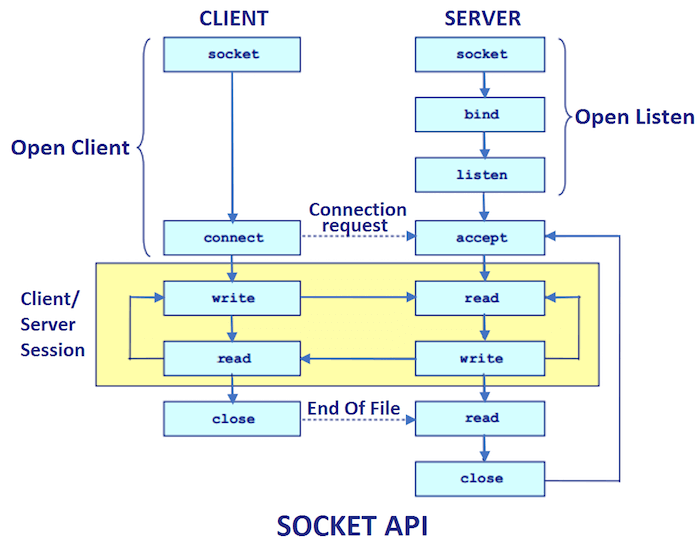
Every client/server pair must have a "protocol" that they agree to use. For example, it must be agreed on, ahead of time, which process communicates first on their connection. Should the client's first step be to send a message while the server's first step is to wait to receive a message, or the other way around? If the first step of both the client and the server is waiting to receive a message, then the two processes will deadlock (why?). So it's important to establish a rule about who writes and who reads first.
The client and server need to agree on how many turns of reading and writing each process will take. They need to agree on how they will determine when to terminate their connection. They need to agree on the format of the data that they transmit. For example, if they agree to send text data, then they also need to agree on a character encoding (UTF-8, ASCII, etc.). If they agree to send binary numeric data, then they might need to agree whether decimal numbers will be sent as floats or doubles and also what byte order to use.
The folder simple_client-server_pairs.zip contains six pairs of client/server programs that use sockets to communicate with each other.
Each client/server pair implements a different (but simple) application layer protocol. Each client/server pair documents its protocol in the Javadoc comment at the beginning of each source file. You can use the "build_Javadocs.cmd" script file to create the Javadocs folder and then read the documentation in a convenient way.
For each client/server pair, compile both the client and the server program, start the server program in one command-line terminal window, and then start the client in another command-line terminal window.
For example, try the first client/server pair. Open a terminal window in the "simple_client-server_pairs" folder and compile the programs "EchoServer_v1.java" and "EchoClient_v1b.java".
    simple_client-server_pairs> javac EchoServer_v1.java
    simple_client-server_pairs> javac EchoClient_v1b.java
In one command-line terminal window, run "EchoServer_v1".
simple_client-server_pairs> javac EchoServer_v1
Notice how the server process logs to the terminal window basic information about itself.
In a second command-line terminal window run "EchoClient_v1b".
simple_client-server_pairs> java EchoClient_v1b
Notice that the client process also logs basic information about itself, and the server process logs information about the client. At the prompt, type a message to send to the server. Notice that both the server and the client log information about the exchange of messages.
Each of the servers is programmed to accept an arbitrary number of connections from clients. After you launch a client and it communicates with the server, launch another client, then another client. Notice that the server logs to its console window a count of each client connection.
Here are descriptions of the protocols implemented by the client/server pairs.
The first client/server pair,
   EchoServer_v1.java
   EchoClient_v1a.java
   EchoClient_v1b.java
implements a very simple protocol. The client communicates first and sends one line of text to the server and then waits for a response from the server. The server receives the client's line of text, echoes it back to the client, and then closes its end of the connection. The client receives the response from the server and then closes its end of the connection. The client "EchoClient_v1a.java" has the string that it sends to the server built into the client code. The client "EchoClient_v1b.java" prompts the user for the line of text to send to the server. The client prompts the user after it has made its connection to the server. This lets the client "block" the server and lets us do some interesting experiments (see below).
The second client/server pair,
   EchoServer_v2.java
   EchoClient_v2.java
implements a protocol similar to the first pair but it echoes two lines of text. The client communicates first and sends one line of text to the server and then waits for a response from the server. The server receives the client's first line of text, echoes it back to the client, and then waits for a second line of text from the client. The client receives the first response from the server, sends the server a second line of text, and then waits for the second response from the server. The server receives the client's second line of text, echoes it back to the client, and then closes its end of the connection. The client receives the second response from the server and then closes its end of the connection.
The third client/server pair,
   EchoServer_v3.java
   EchoClient_v3.java
implements a protocol similar to the second pair but the client can send an arbitrary number of text lines to the server. The client tells the server that it is done sending text by closing its output stream to the socket (but not yet closing the connection), and then waits for a final, summary message from the server. The server immediately echoes back to the client each line of text sent by the client. When the server detects the end-of-stream condition on its input stream from the socket. the server sends one last summary message to the client and then the server closes its end of the connection. After the client receives the last summary message, it closes its end of the connection.
The fourth client/server pair,
   NumericServer.java
   NumericClient.java
implements a binary protocol. The client communicates first and sends to the
server a 4-byte binary int value and then the client waits for the server
to send it the number of double values represented by that integer value.
The server receives the int value from the client and then sends to the
client that many 8-byte binary double values. After sending the doubles
to the client, the server closes its end of the connection. After the client
receives the appropriate number of doubles from the serve, the client closes
its end of the connection. Both the int and the double values are sent in
the big endian byte order, which is the default byte order for the Internet.
The fifth client/server pair,
   NumericTextServer.java
   NumericTextClient.java
implements a text version of the previous protocol. The client communicates first and sends to the server an integer encoded as a text string and then the client waits for the server to send it the number of doubles represented by that integer value. The server receives the integer value from the client and then sends to the client that many doubles encoded as text strings. After sending the doubles to the client, the server closes its end of the connection. After the client receives the appropriate number of doubles from the serve, the client closes its end of the connection. The client and server need to agree on what text encoding to use on each of the two connection streams. They do not have to use the same encoding on both streams, but they do need to agree on what encoding is used on each stream. The client sends an ASCII encoded integer to the server. The server sends UTF-16BE encoded doubles to the client. Also, since the numbers are sent as encoded text, and every number can have a different number of digits, the server need to use white space characters to separate the double values from each other.
The sixth client/server pair,
   UploadServer.java
   UploadClient.java
implements a binary protocol. The client sends to the server all the data from the client's standard input stream. The server stores the data it receives from a client in a file in the server's current directory. The communication is a binary protocol because the server does not know, and does not need to know, what kind of data is being sent to it by the client. The client may upload a text file or a binary file to the server. The server must use a binary input stream from the client and a binary output stream to the local saved file.
Experiments
Here are several experiments that you can do using the client/server programs from simple_client-server_pairs.zip.
Experiment 1: Start up "EchoServer_v1.java" and then run "EchoClient_v1b.java" but do not yet type in any input text. Then run an instance of "EchoClient_v1a.java" and then run another instance of "EchoClient_v1b.java" (you will need four command-line terminal windows). Then type a line of input to the first instance of "EchoClient_v1b.java". What happens? Why?
Experiment 2: Start up "EchoServer_v2.java" and then run "EchoClient_v1a.java". Then run another instance of "EchoClient_v1a.java". What happens? Why?
Experiment 3: Start up "EchoServer_v3.java" and then run "EchoClient_v1a.java". Then run another instance of "EchoClient_v1a.java". Then run an instance of "EchoClient_v2.java". What happens? Why?
Experiment 4: Start up "EchoServer_v1.java" and then run "EchoClient_v3.java". What happens? Why?
Experiment 5: Start up "EchoServer_v3.java" and then type in the following URL into your browser's address bar.
localhost:5000
What happens? This experiment works a bit better if you stop the server from echoing lines back to the client. You need to comment out two lines of code in the server and then recompile it.
Experiment 6: Start up "NumericServer.java" and then run "EchoClient_v1b.java". Enter two characters at the prompt, say "xy", and tap the Enter key. What happens? Why?
Still using "NumericServer.java", run "EchoClient_v2.java". Tap the Enter
key at the first prompt. What happens? Why? Tap the Enter key again at the
second prompt. What happens? Why? (Hint: Where does the number 538978406
come from?)
Experiment 7: Start up "EchoServer_v3.java" and then run "UploadClient.java" (without any file redirection). Type a bunch of input lines followed by ctrl-z. Why doesn't the server respond to each of the client's input lines? Why do all of the server's responses come after the client closes its input to the server?
Experiment 8: Try running two instances of a server on the same port number. What happens? Try running two instances of a server on two different port numbers (pass the port number as a command-line argument). Run clients that connect to either running server (give the clients command-line arguments to tell them which running server to connect to).
Experiment 9:
In the program "EchoServer_v3.java", change the constructor call for ServerSocket
from
serverSocket = new ServerSocket(portNumber);
to
serverSocket = new ServerSocket(portNumber, 4); // Set the value of backlog.
This sets the size of the backlog queue for the ServerSocket to 4.
Recompile the program, and run the server. In a second terminal window,
compile and run "EchoClient_v1b.java". Do not type a line of text for
the client; let the client block the server. In
another terminal window, run a second instance of "EchoClient_v1b.java". In
another terminal window, run a third instance of "EchoClient_v1b.java". In
another terminal window, run a fourth instance of "EchoClient_v1b.java". In
another terminal window, run a fifth instance of "EchoClient_v1b.java". What
happens? See the Javadoc for the ServerSocket constructor with the backlog
parameter.
Experiment 10: Try running a server and its client on two different computers at the same time, so you are really using a network.
Experiment 11: Use the command-line program "netstat" to get information about server and client programs that are currently running on your computer.
  > netstat -n -p tcp
  > netstat -f -p tcp
  > netstat /?
- netstat - Microsoft Learn
- netstat(8) - Linux manual page
Experiment 12: In a PowerShell terminal window, use the "Get-NetTCPConnection" command to get information similar to "netstat" about running server and client programs.
PS > Get-NetTCPConnection
- Get-NetTCPConnection - Microsoft Learn
Experiment 13: Download and run the Windows GUI program "TCPView" to get information similar to "netstat" and "Get-NetTCPConnection".
- TcpView - Microsoft Learn
Experiment 14:
How do "netstat", "Get-NetTCPConnection", and "TCPView" distinguish between
a communicating network connection and a network connection that is stuck in
the "backlog" queue of a ServerSocket?
Fetching a URL
In the previous readme document, we showed how to
fetch a URL
using Java's "high level" networking classes, the HttpURLConnection
and HttpClient classes. These two classes hide from the programmer
the Sockets API and the HTTP protocol.
In JShell, we can write our own simple "fetch client" that uses a socket
and some HTTP to fetch the content pointed to by a URL. We can create a
local Socket object and connect it to a remote HTTP server process in
just a few lines of code.
The following code gets some basic information from a Socket object that
is connected to the "cs.pnw.edu" server and then sends that remote server
process a simple HTTP message and waits for a reply.
var socket = new Socket("cs.pnw.edu", 80)     // Steps 5, 6, 7.
socket.isConnected()
socket.getRemoteSocketAddress()
socket.getInetAddress()
socket.getPort()
socket.getLocalSocketAddress()
socket.getLocalAddress()
socket.getLocalPort()
var out = socket.getOutputStream()             // Step 8.
var in  = socket.getInputStream()              // Step 8.
out.write("GET / HTTP/1.0\r\n\r\n".getBytes()) // Step 9.
var bytes = in.readAllBytes()                  // Step 9.
new String(bytes)
socket.close()                                 // Step 10.
socket = null                                  // Step 11.
Here are a few more client interactions with a remote server process.
var socket = new Socket("www.google.com", 80)                       // Steps 5, 6, 7.
socket.getOutputStream().write("GET / HTTP/1.0\r\n\r\n".getBytes()) // Steps 8, 9.
new String(socket.getInputStream().readAllBytes())                  // Steps 8, 9.
socket.close()                                                      // Step 10.
socket = null                                                       // Step 11.
var socket = new Socket("github.com", 80)      // Steps 5, 6, 7.
var out = socket.getOutputStream()             // Step 8.
var in  = socket.getInputStream()              // Step 8.
out.write("GET / HTTP/1.0\r\n\r\n".getBytes()) // Step 9.
var inBytes =  in.readAllBytes()               // Step 9.
new String(inBytes)
socket.close()                                 // Step 10.
socket = null                                  // Step 11.
var socket = new Socket("norvig.com", 80)
var out = socket.getOutputStream()
var in  = socket.getInputStream()
out.write("GET /big.txt HTTP/1.1\r\nHost: norvig.com\r\n\r\n".getBytes())
var bytes = in.readAllBytes() // 6 MB, takes some time to download.
var msg = new String(bytes)
msg.length()
socket.close()
socket = null
System.out.print(msg) // very long
We can create a "secure socket" and connect it to a URL that uses https.
https://httpbin.org/status/418.
import javax.net.ssl.SSLSocket
import javax.net.ssl.SSLSocketFactory
var sslFactory = (SSLSocketFactory)SSLSocketFactory.getDefault()
try ( var sslSocket = (SSLSocket)sslFactory.createSocket("httpbin.org", 443);
      var out = sslSocket.getOutputStream();
      var in  = sslSocket.getInputStream() ) {
   out.write("GET /status/418 HTTP/1.1\r\nHost: httpbin.org\r\nConnection: close\r\n\r\n".getBytes());
   var inBytes =  in.readAllBytes();
}
try ( var scanner = new Scanner(new ByteArrayInputStream(inBytes)) ) {
   while (scanner.hasNextLine()) System.out.println(scanner.nextLine());
}
sslFactory = null
The above example is written using try-with-resources statements. All the closeable objects get automatically closed and garbage collected.
The end-of-message problem
When a client and a server implement an application layer protocol (the yellow box in this Socket_API diagram), they enter a cycle where the client sends the server a "request message" and the server sends back to the client a "response message".
When the client process sends a request message, and the client reaches the end of that message, the client needs a way to tell the server that there is no more data and the server should switch from reading data from the client to writing its response message back to the client. Without some kind of signal from the client that the request message is complete, the server has no way to know if a pause in the client's data transmission means the end of a message (and the client is waiting for a response) or if a pause really is just a pause and the client's data transmission will continue.
When the server sends its response message back to the client, the server has a similar problem. It needs a way to signal the client that the server has finished sending a complete response message.
The client also needs a way to signal to the server that it wants to exit the request/response cycle and close the connection (or, it may be the server that wants to signal its intention to end the cycle and close the connection).
The problem is that pauses in data transmission are common in networks. A pause could be caused by a large surge in network traffic, or it could be caused by a temporary failure somewhere in the network, or it could be caused by the other end of the connection needing to do a long calculation. An endpoint of a network connection that is reading data can never be sure when a pause in data transmission means that the other end has stopped sending data and is waiting for a reply, or if the data transmission will soon resume.
One solution to this problem is to define, as part of the application layer protocol, a specific length for the request and response messages. For example each message may be defined to be a specific number of bytes, or to be exactly one line of text. In this case, when the server has read the specified number of bytes (or one line of text) from the client, the server knows that it has read the whole request message and the server can switch to sending the response message. If the server has not yet read the correct number of bytes and there is a (long) pause in the data transmission, then the server just waits, since it knows that there should be more data arriving.
Similarly, an application layer protocol can specify an exact number of request/response cycles between the client and server.
The problem with this strategy is that it does not allow for arbitrarily sized requests or responses or an arbitrary number of request/response cycles. In most application layer protocols, the length of every message cannot be known in advance.
Similarly, the number of requests made by every client cannot always be known in advance
An application layer protocol needs a strategy that allows the client and the server to send an arbitrary amount of data in a message and for the recipient to be able to know when it has received all of the (arbitrary) data in a message.
Similarly, the protocol needs a strategy that allows either the client or the server to signal when it wants to end the request/response cycle.
In general, there are three ways in which a client/server pair can send messages of arbitrary size and still coordinate the exchange of their read/write roles. They can coordinate by,
- using end-of-stream,
- using a counter,
- using a sentinel value.
Each of these three strategies can also be used to signal the end of the request/response cycle.
Let's consider a specific example of a client/server pair that needs to solve the "end-of-message" problem.
Suppose we have a client that wants to send to the server sequences of integer values and have the server send back the sum of each sequence. We will create an application layer protocol in which each request message from the client to the server is one sequence of integer values. The server's response message will be a single integer value that is the sum of the sequence.
As part of the protocol, we need to specify a data format for the request and response messages. Let us have all the integer values encoded as ASCII strings of decimal digits with each integer value followed by a space character.
Also, let the client signal that there are no more request messages by closing its end of the connection.
We still need to specify how the server, while it is reading integer values, can know when it has received the last value in a sequence.
This leads us to three versions of our application layer protocol.
In the first version, we will specify that the client should close its connection to the server right after the client sends the last value in a sequence. Since the client is closing its connection to the server, the client can only send one request message (one sequence) to the server.
In the second version of our protocol, we will specify that the client should send, at the beginning of each sequence, the number of values in the sequence. The server will receive this count value first, and then count that many values, and then know it has received a complete request message.
In the third version of our protocol, we will specify that the client should send a negative value at the end of each sequence. When the server reads a negative value, it knows that the current sequence is complete. Since the sentinel value is a negative number, none of the data values in a sequence can be negative, so this strategy only allows the client to send sequences of positive integers.
The second and third strategies allow the client to send as many sequences (request messages) as it wants.
In all three protocols, the client sends the server a "stream" of integer values separated by spaces. In the second and third protocols, the server can always parse this stream into distinct messages and send a response at the end of each message. For example, below there is a stream of integer values for each of the second and third protocols. Each stream is made up of five messages. For each stream, parse it to find the five messages and determine what the server's response would be for each request message.
    4 5 3 -6 7 3 8 -3 12 0 4 -5 0 3 2 5 11 12 13 14 15

    4 1 0 3 15 4 -1 4 12 9 32 -1 -1 12 8 3 0 1 -1 0 -1
The "end-of-message" sub folder of simple_client-server_pairs.zip contains three pairs of client/server programs that demonstrate these three protocols.
The three client/server pairs in that folder,
- AdditionClient_v1.java / AdditionServer_v1.java
- AdditionClient_v2.java / AdditionServer_v2.java
- AdditionClient_v3.java / AdditionServer_v3.java
use, respectively,
- end-of-stream,
- a counter,
- a sentinel value.
The first client/server pair uses end-of-stream to denote that the client is done writing its request message and so the server should stop reading integers and send its response. Since the client uses end-of-stream to denote it is done writing (that is, the client closes its output stream to the server), the client can only send one request to the server.
In the second client/server pair, the client begins each request with a count value to let the server know how many integers are in the request. When the server has read than many integers, the server switches over to writing its response. Since the client has not closed its output stream to the server, the client can send any number of requests. The client uses end-of-stream (that is, it closes its output stream) to denote the end of its requests to the server.
In the third client/server pair, the client uses a negative number at the end of each request message as a sentinel value to let the server know that it has read the last value in the request. When the server reads a negative value it should switch from reading integers to writing its response. Since the client is using a negative number as a sentinel, it cannot use negative numbers as data values. Since the client has not closed its output stream, the client can send any number of requests to the server. The client uses end-of-stream to denote the end of its requests to the server.
Let us look at JShell implementations of the second and third client/server protocol.
Here is the server for the second protocol that uses counter values. You can copy and past this code into a JShell session.
var clientCounter = 0
try (var serverSocket = new ServerSocket(5000)) { // Steps 1, 2.
   System.out.println("SERVER online:");
   while (true) {
      try (var socket = serverSocket.accept();                    // Steps 3, 6.
           var in = new Scanner(socket.getInputStream());         // Step 8 and 7.
           var out = new PrintWriter(socket.getOutputStream())) { // Step 8 and 7.
         ++clientCounter;
         var clientIP = socket.getInetAddress();
         var clientPort = socket.getPort();
         System.out.println("SERVER: Client " + clientCounter
                          + ": IP: " +  clientIP.getHostAddress()
                          + ", Port: " + clientPort);
         // Step 9. Read each sequence of integers, sum them, send back the sum.
         while (in.hasNextInt()) {
            var length = in.nextInt();
            System.out.println("SERVER: Client " + clientCounter
                             + ": Expecting sequence of length " + length + ".");
            System.out.print("SERVER: Client " + clientCounter + ": Sequence is: ");
            var sum = 0;
            for (int i = 0; i < length && in.hasNextInt(); ++i) {
               var n = in.nextInt();
               sum += n;
               System.out.print(n + " "); // Log the sequence.
            }
            System.out.println("\nSERVER: Client " + clientCounter + ": Message received: sum = " + sum);
            out.println(sum);
            out.flush();
         }
      } // Step 10.
      System.out.println("SERVER: Client " + clientCounter + ": Closed socket.");
   }
} // Step 12.
Here is the client for the above server. Start a second JShell session and copy and paste this code into it. This code will connect to the server and then expect you to type into the console the data values that this client should send to the server. When you are done typing values, use Ctrl-D to send the end-of-file signal to this client. NOTE: Even on Windows, you use Ctrl-D to denote eof in JShell!
var remoteHost = "localhost"
var remotePort = 5000
var ipAddress = InetAddress.getByName(remoteHost);
System.out.println("CLIENT: Connecting to server: " + remoteHost
                 + " on port " + remotePort );
try (var socket = new Socket(ipAddress, remotePort);        // Steps 5, 6, 7.
     var in = new Scanner(socket.getInputStream());         // Step 9 and 8.
     var out = new PrintWriter(socket.getOutputStream())) { // Step 9 and 8.
   System.out.println("CLIENT: Connected to server.");
   var localPort = socket.getLocalPort();
   System.out.println("CLIENT: Local Port: " + localPort);
   // Step 9. Send the server multiple integer sequences.
   var stdin = new Scanner(System.in);
   while (stdin.hasNextInt()) {
      var length = stdin.nextInt();
      out.print(length + " ");
      out.flush();
      String request = length + " ";  // For logging the request.
      for (int i = 0; i < length; ++i) {
         var n = stdin.nextInt();
         out.print(n + " ");
         out.flush();
         request += n + " ";  // For logging the request.
      }
      System.out.println("CLIENT: Request is: " + request);
      System.out.println("CLIENT: Request sent to the server.");
      var response = in.nextInt();
      System.out.println("CLIENT: Server response is: sum = " + response);
   }
} // Step 10.
Here is the server for the third protocol that uses sentinel values. Copy and paste this code into a new JShell session to start this server.
var clientCounter = 0
try (var serverSocket = new ServerSocket(5000)) { // Steps 1, 2.
   System.out.println("SERVER online:");
   while (true) {
      try (var socket = serverSocket.accept();                    // Steps 4, 7.
           var in = new Scanner(socket.getInputStream());         // Step 9 and 8.
           var out = new PrintWriter(socket.getOutputStream())) { // Step 9 and 8.
         ++clientCounter;
         var clientIP = socket.getInetAddress();
         var clientPort = socket.getPort();
         System.out.println("SERVER: Client " + clientCounter
                          + ": IP: " +  clientIP.getHostAddress()
                          + ", Port: " + clientPort);
         // Step 8. Read each sequence of integers, sum them, send back the sum.
         while (in.hasNextInt()) {
            System.out.print("SERVER: Client " + clientCounter + ": Sequence is: ");
            var sum = 0;
            var n = -1;
            while (in.hasNextInt() && (n = in.nextInt()) > 0 ) {
               sum += n;
               System.out.print(n + " "); // Log the sequence.
            }
            System.out.println("\nSERVER: Client " + clientCounter + ": Message received: sum = " + sum);
            out.println(sum);
            out.flush();
         }
      } // Step 10.
      System.out.println("SERVER: Client " + clientCounter + ": Closed socket.");
   }
} // Step 12.
Here is the client for the above server. Start another JShell session and copy and paste this code into it. This code will connect to the server and then expect you to type into the console the data values that this client should send to the server. When you are done typing values, use Ctrl-D to send the end-of-file signal to this client. NOTE: Even on Windows, you use Ctrl-D to denote eof in JShell!
var remoteHost = "localhost"
var remotePort = 5000
var ipAddress = InetAddress.getByName(remoteHost);
System.out.println("CLIENT: Connecting to server: " + remoteHost
                 + " on port " + remotePort );
try (var socket = new Socket(ipAddress, remotePort);        // Steps 5, 6, 7.
     var in = new Scanner(socket.getInputStream());         // Step 9 and 8.
     var out = new PrintWriter(socket.getOutputStream())) { // Step 9 and 8.
   System.out.println("CLIENT: Connected to server.");
   var localPort = socket.getLocalPort();
   System.out.println("CLIENT: Local Port: " + localPort);
   // Step 9. Send the server multiple integer sequences.
   var stdin = new Scanner(System.in);
   while (stdin.hasNextInt()) {
      String request = ""; // For logging the request.
      var n = -1;
      while (stdin.hasNextInt() && (n = stdin.nextInt()) > 0) {
         out.print(n + " ");
         out.flush();
         request += n + " ";  // For logging the request.
      }
      out.print(n + " ");
      out.flush();
      request += n;
      System.out.println("CLIENT: Request is: " + request);
      System.out.println("CLIENT: Request sent to the server.");
      var response = in.nextInt();
      System.out.println("CLIENT: Server response is: sum = " + response);
   }
} // Step 10.
In all these client/server pairs, the client uses end-of-stream to denote the end of the client's requests to the server (that is, signal to the server that the client wants to exit the yellow box in this Socket_API diagram). But it's also possible for the client to use a counter or a sentinel to let the server know when the client no longer has more requests to make. It is left as an exercise to write client/server pairs that use either a counter or a sentinel to denote the end of client requests.
The end-of-stream condition is not really a reliable way to denote the end of a message. When a server process detects the end-of-stream condition on the input stream from its socket, the server assumes that it has received all of the data sent by the client. But that may not be true. It may be that the server detects end-of-stream because of a failure somewhere in the network connection. When a process reads from an input stream connected to a file, the end-of-stream condition always reliably means that there is no more data. But when a process reads from an input stream connected to a socket or a pipe, the end-of-stream condition may be caused by a failure on the other end of the stream.
In these client/server pairs, only the client is sending a variable amount of information. The server always sends back a single number. It could be the case that the client always sends a fixed amount of information and the server sends a variable amount. And it could also be the case that both the client and the server always send a variable amount of information in each exchange. Any one of the above three techniques could be use by either the client or the server to denote the "end-of-message" in an exchange of information.
These techniques for exchanging read/write roles are used extensively in the HTTP protocol for web servers and clients. We will see several different sentinel values and a variety of counters being used by the HTTP protocol.
The client/server pairs in the "end-of-message" folder all use text data to send integer numbers. They could be rewritten to use a binary integer data format for sending values back and forth. It is left as an exercise to rewrite one of the client/server pairs to use binary streams and a binary data format.
The "end-of-message" problem can also come up when two processes communicate over a pipe. Suppose that ProcessA writes sequences of integer values into a pipe and ProcessB is supposed to read each sequence and print its sum. How does ProcessA denote the last number in a sequence so that ProcessB can know when it is time to print the sum and begin adding up a new sequence of integers? The length of every sequence could be specified ahead of time, but that is not very versatile. ProcessA could use end-of-file, but then it can only send one sequence of integers. ProcessA could pause for a specific amount of time, and this pause is the end-of-message signal. This can be made to work with a pipe (but not with a network connection), but it is too weird of a solution. ProcessA should either send a count value at the beginning of each integer sequence or a sentinel value at the end of each sequence and use the end-of-file condition to denote that there are no more sequences.
Exercise: Suppose that an application layer protocol specifies that a request message should be exactly "one line of ASCII text". Explain why this is using a sentinel value, not a counter. What is the sentinel?
Exercise: Suppose that an application layer protocol specifies that a request message should be exactly "3 lines of ASCII text". Is this using a counter or a sentinel?
Exercise: One solution for ending the request/response cycle is to only allow one request per client connection. If a client actually wants to make three requests, then the client needs to create three connections (this is the way HTTP 1.0 worked). What is wrong with this strategy?
Exercise: One solution for ending the request/response cycle is to have the client close the connection after it has received the last response that it wants. What is wrong with this strategy?
Exercise: Suppose that a client is sending sequences of integer values to a server, the sequences can be of arbitrary length, the client does not know the length of a sequence until it gets to the end of the sequence, and the sequences can contain any possible integer value. Under these conditions the client must use a sentinel value at the end of each sequence. Come up with a possible sentinel value for either a text or a binary stream.